CueDeck Event Check-in
Every guest through the door in seconds
Import your guest list, email everyone a QR code, and run the registration desk from any laptop or tablet. Badges print as people arrive, and it keeps working when the venue Wi-Fi does not.
Free to set up and test · €249 excl. VAT per event to go live · No subscription
How it works
Ready before the doors open
Three steps, all in your browser. No app to install and no hardware to rent.
Build your guest list
Share a registration link so guests sign themselves up, or upload a CSV and see who will be added, updated or skipped before anything is saved.
Send QR codes
Every guest gets an email with a personal QR code. Try the desk with a free test run first.
Check people in
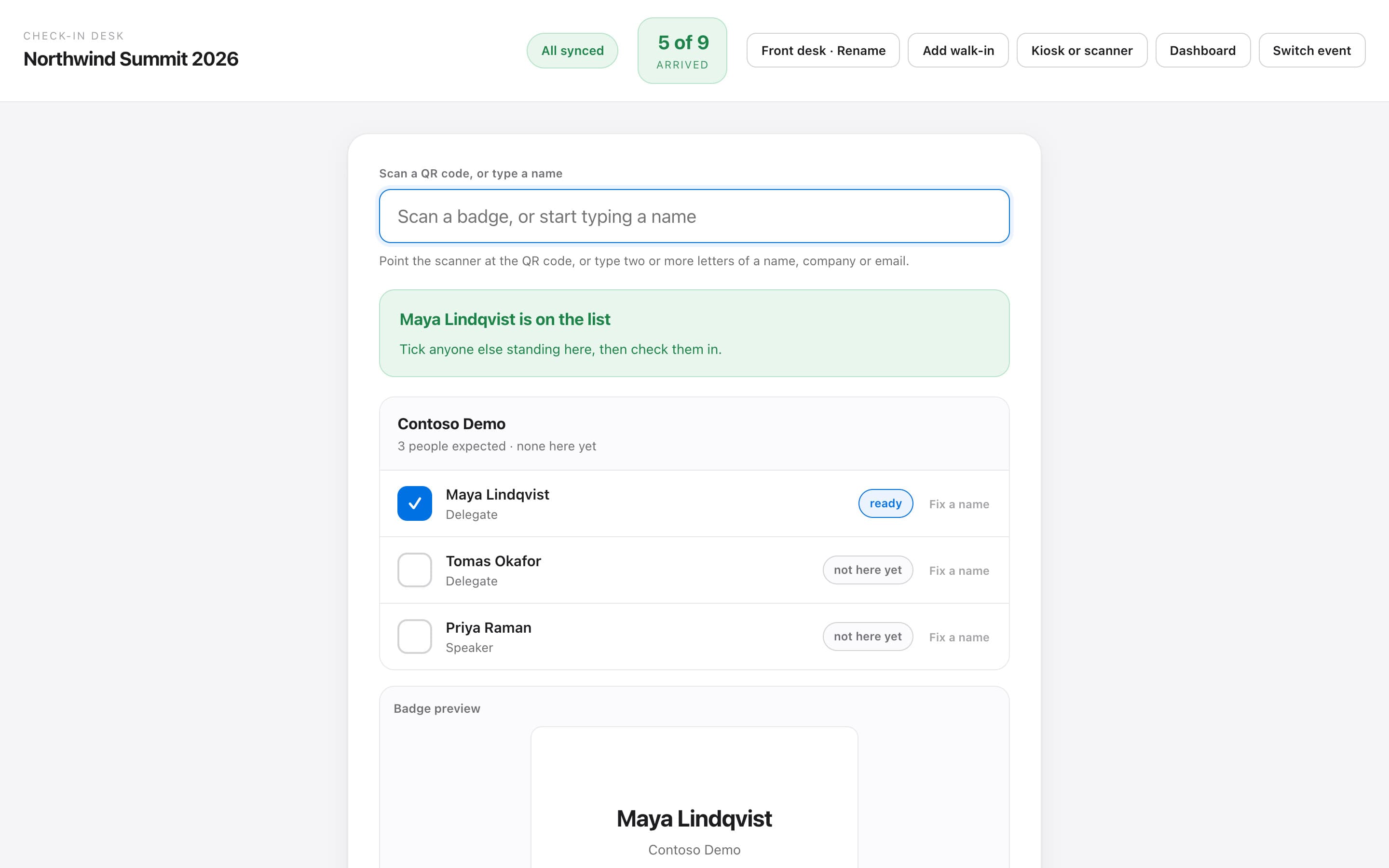
Scan or search at the desk, or point a phone at the door. Badges print as people arrive.
Guest list
Your guest list, checked before it is saved
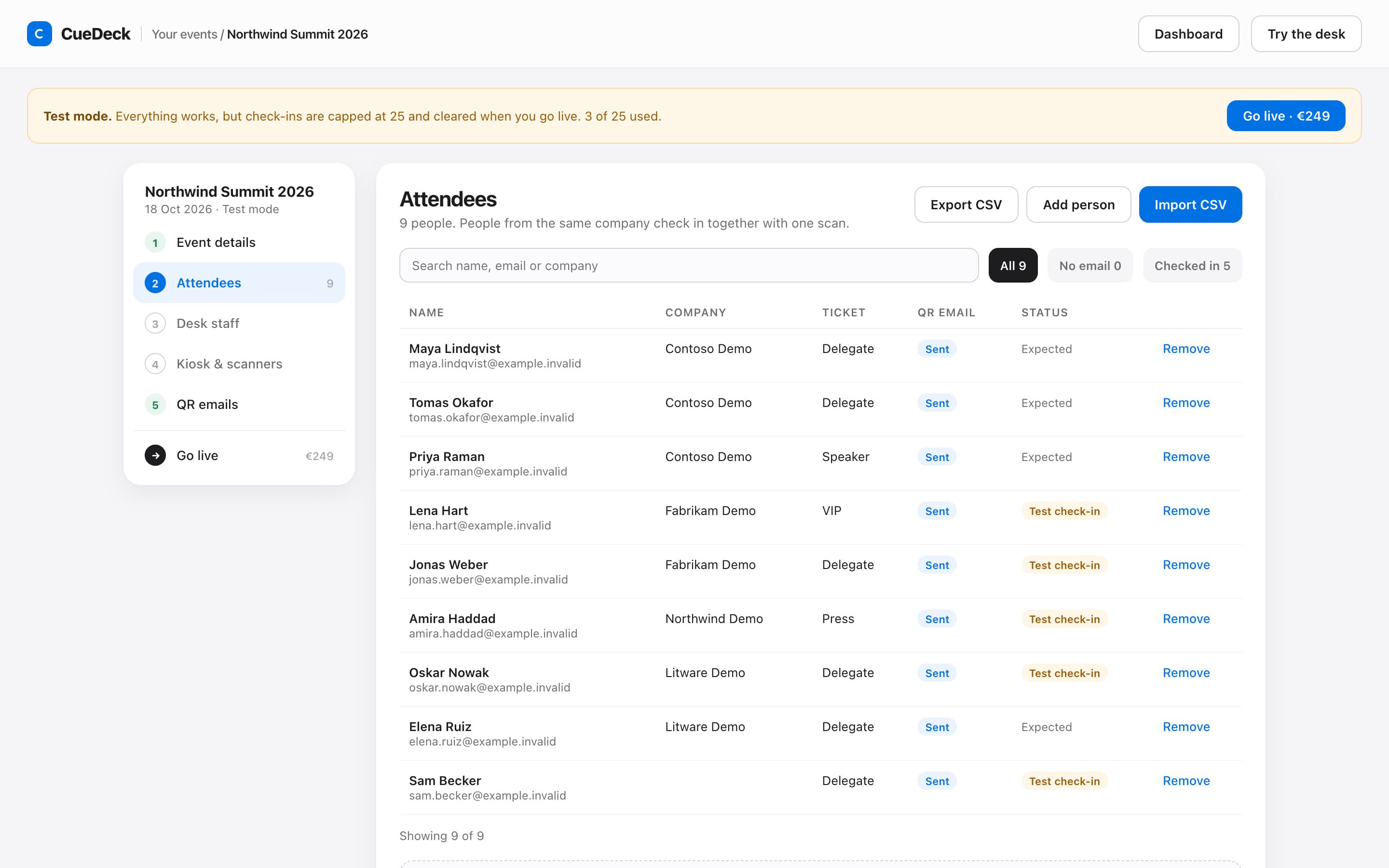
Drop in a CSV and CueDeck shows who will be added, updated or skipped. Track who has their QR email, who has arrived, and test everything before you pay.
Door scanners
Any phone becomes a door scanner
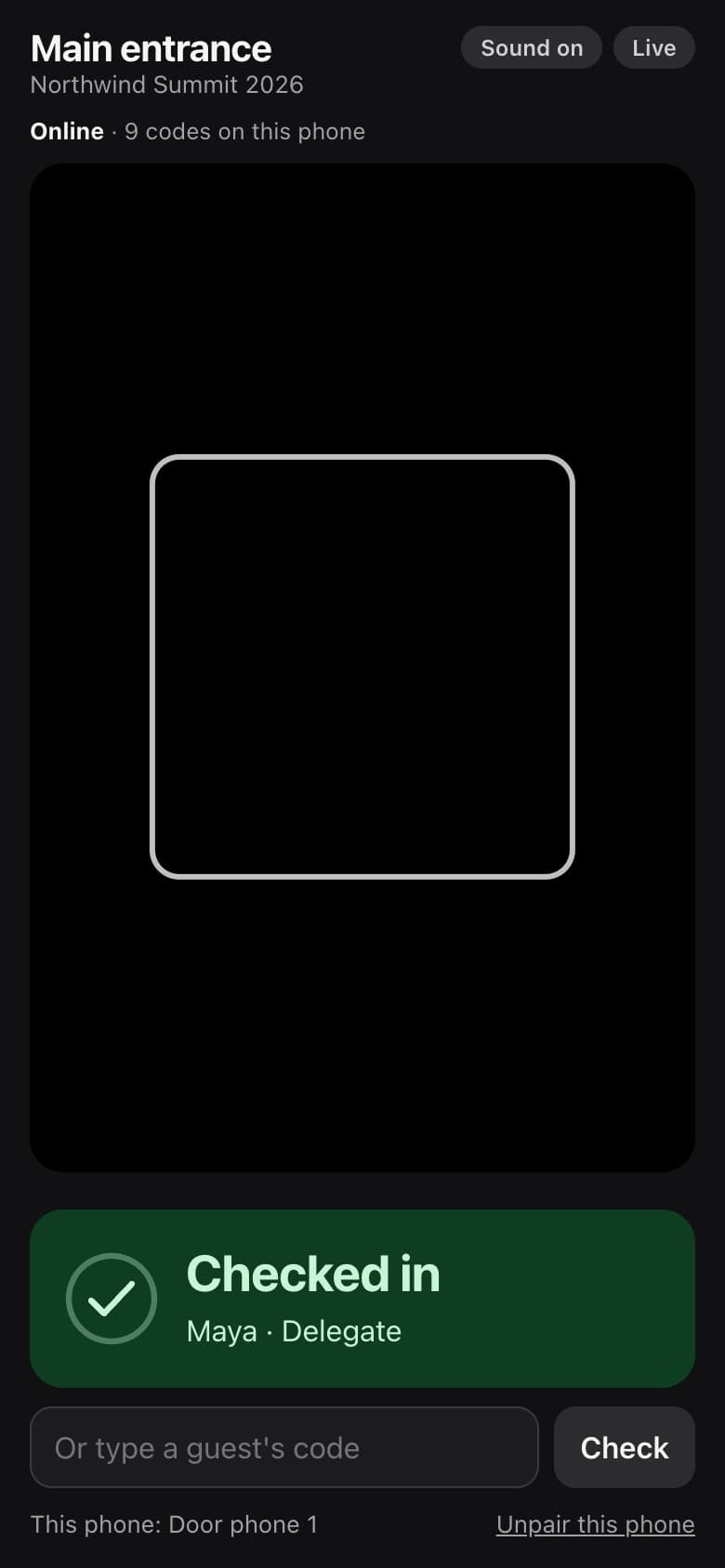
Pair a phone with a code from the desk and point it at guests' QR codes. It confirms each arrival with a sound and a clear tick, and refuses codes from other events.
- No app to install
- Each scanner is tied to one entrance
- Revoke a phone from the desk at any time
Live dashboard
See the doors from anywhere
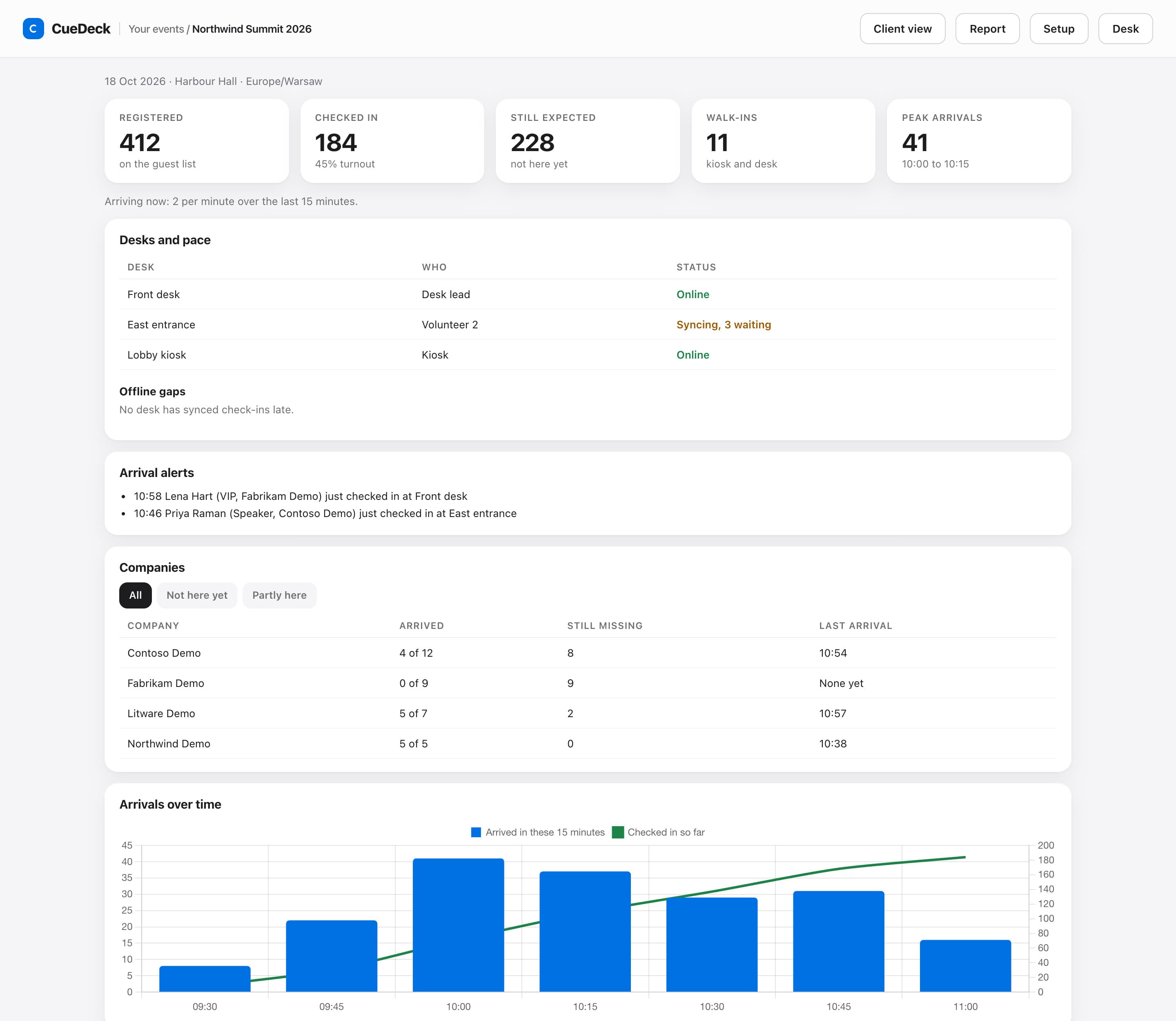
Arrivals over time, every desk and its sync status, which companies are still missing people, and alerts the moment a VIP walks in.
- Arrivals per 15 minutes and turnout by ticket type
- Company board: who is here, who is partly here, who has not arrived
- Desk health, including check-ins waiting to sync
Built for the busy hour
The queue moves, the desk stays calm
Designed for the twenty minutes when everyone arrives at once.
Online registration page
Share a link and guests register themselves, with up to five questions of your own. Set a capacity and a closing time, and replace the link if it leaks.
Whole teams at once
One scan brings up everyone from the same company. Tick who is standing there and check them in together.
Badges on demand
Print from the desk to any printer Chrome can reach. No print server and no extra software.
Self-registration kiosk
Walk-ins sign themselves in on a tablet. Pair it with a code and revoke it any time.
Works offline
If the Wi-Fi drops, the desk keeps checking people in and syncs when the connection is back.
Mistakes are undoable
Checked in the wrong person? Undo it. Every correction stays in the log, nothing is erased.
Staff see only their event
Invite registration staff by email. They get the desk for your event and nothing else.
Arrival alerts
Pick the ticket types that matter, such as VIP or Speaker. When one arrives, every desk and the dashboard shows it.
Attendance export
Download the guest list with arrival times as a CSV whenever you need it.
After the event
The report writes itself
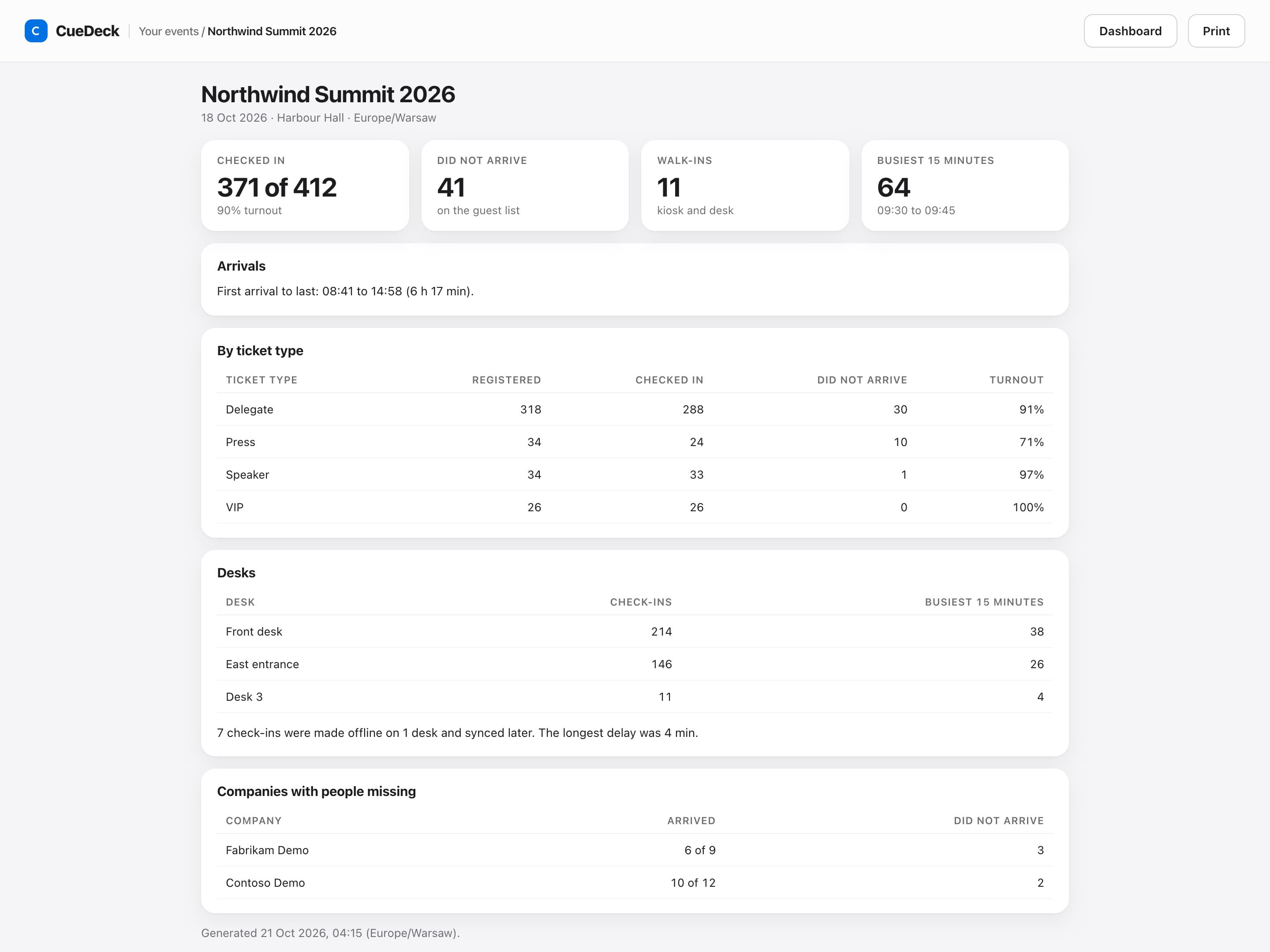
When check-in closes, a report lands in your inbox: turnout by ticket type, the busiest fifteen minutes, how each desk performed, and which companies had people missing.
Pricing
One price per event. Everything included.
No per-attendee fees, no ticket commission, no subscription.
Check-in · per event
€249excl. VAT
Set up and test free. Pay when you go live.
- Unlimited desks and door scanner phones
- Registration page with your own questions
- QR code email to every guest
- Badge printing and self-registration kiosk
- Live dashboard, arrival alerts and post-event report
- Offline desk and attendance export
Already on CueDeck?
Same login, same events
Check-in works on the events already in your CueDeck console. Open check-in, pick the event, and add your guest list.
Not using CueDeck for the show itself? You do not need to. Check-in works on its own.
Questions
Frequently asked questions
What does going live mean?
Setup and a test run are free: up to 25 test check-ins, cleared when you go live. Going live is a one-off €249 excl. VAT payment for that event, which turns on real check-ins and QR emails.
Can guests register themselves before the event?
Yes. Turn on the registration page in setup and share its link. Guests enter their name, email, company and your questions. Each guest confirms their email address before they join the list, then gets their QR code by email. It is included in the per-event price.
Do I need special hardware?
No. Any laptop or tablet with Chrome runs the desk. A USB QR scanner is faster but optional, phones work as door scanners, and badges print to any printer Chrome can use.
Is there a limit on attendees?
There is no per-attendee fee and no ticket commission. Each CSV import takes up to 5,000 rows, and you can import more than once.
When can guests be checked in?
From a week before the event until two days after it. The post-event report is emailed to you once that window closes.
What happens if the venue Wi-Fi fails?
The desk keeps working and stores check-ins on the device. They sync on their own when the connection returns, and the dashboard shows any desk that is still catching up.
Do I need to use CueDeck for the rest of the show?
No. Check-in works on its own. If you already run your show in CueDeck, it uses the same login and the same events.
Set up your next event's check-in today
Import your guest list and try the desk free. Pay only when you are ready to go live.
Get started free